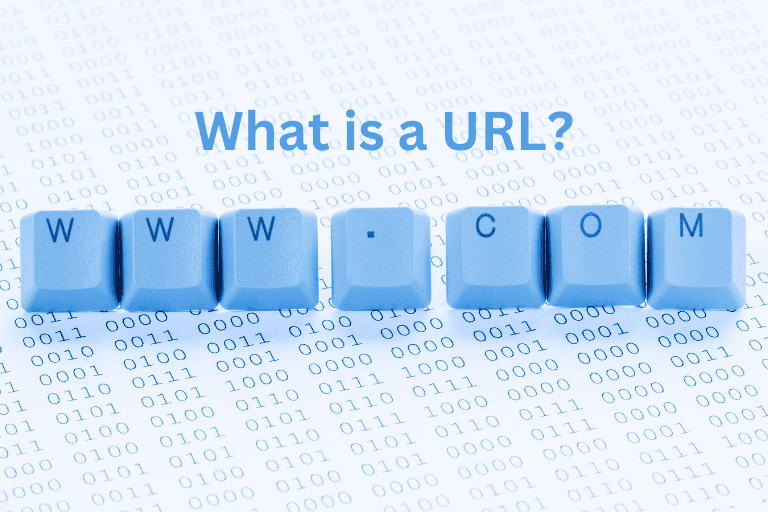
On this vast landscape of the internet, where hundreds of millions of interconnected servers house billions of pages and millions of websites, the URL (Uniform Resource Locator) stands as a fundamental technology that helps simplify web navigation.
A URL is an address or reference used to access resources on the internet. It specifies the location of a resource and the protocol that’s used to access it.
In this blog, we’ll explore URLs in-depth, explaining their definition, structures, types, importance, URL vs URI, best practices for URL structure, and more.
What is a URL?
URL stands for Uniform Resource Locator. A URL is a unique identifier or web address used to locate resources on the internet. It guides your web browser to a particular document, web page, image, or other online resource. It separates a single webpage from billions of other web pages available on the internet.
When you enter a URL, the browser converts the domain name into the server’s IP address. The rest of the URL gives the route to the exact page or the file on that server.
For instance, when you enter the website address https://prempalsingh.com/ into a web browser like Google Chrome, the browser will contact the web server hosting prempalsingh. The server will react to your request by providing the website’s home page to your browser.
Types of URL
- Relative vs Absolute URL
A relative URL gives a path relative to the current document while removing the domain and scheme. It is short and simple and is dependent on a document’s current location.
Whereas, an absolute URL provides a complete path to a resource. This includes the path, domain, and scheme.
- Canonical vs Non-Canonical URL
Among a set of comparable or identical pages, the preferred version is the canonical URL. Canonical URL helps search engines recognize which URL to prioritize in indexing.
Whereas, any version of a web page that’s not specified as the preferred URL is referred to as a non-canonical URL. Non-canonical URLs could differ because of session IDs, parameters, or tracking codes.
- HTTPS vs non-HTTP URL
HTTP (Hypertext Transfer Protocol) URLs do not have encryptions. For this reason, sending sensitive data over them might not be safe.
HTTPS (Hypertext Transfer Protocol Secure) is a more secure version of HTTP and is encrypted. It offers a secure connection for the transmission of data.
How does the URL work?
The basic mechanism driving the internet is the interaction between the browser, the web server, and the URL. Let’s have a look at the working of the URL.
When a user types a URL in the search bar, he/she is instructing the browser where to go on the internet exactly. Then the browser requests a web server that’s located at that address. The file or webpage that the user is attempting to access is stored on this server. Now after the server has finished processing the request of the user, it sends back the requested resource like a webpage, video, image, etc. Then the contents of that resource are displayed on the browser.
URL Structures (Parts of a URL)
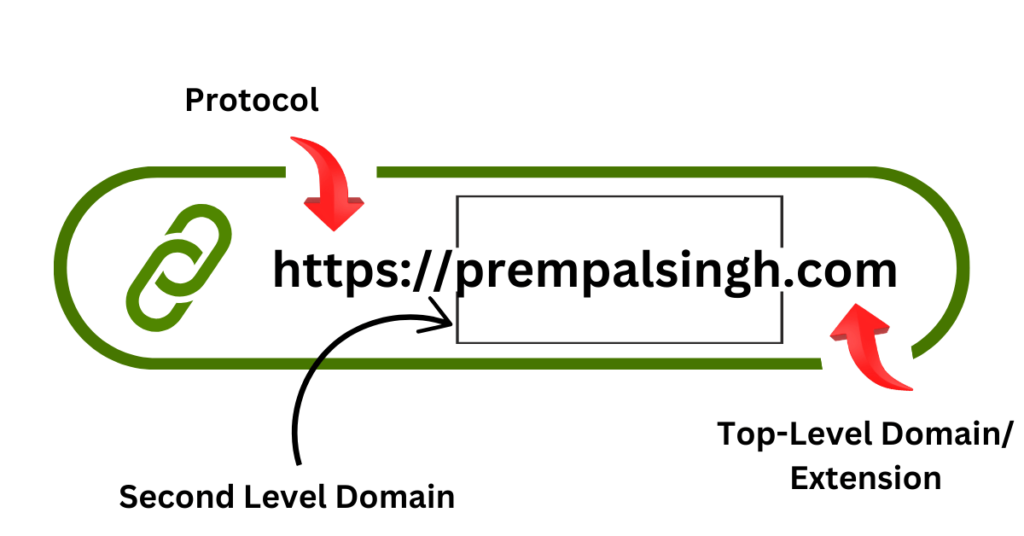
- Domain name
A domain name is a unique reference representing a webpage. All other pages flow from a URL’s key hub, which is a domain name. The company’s website or name in the URL is called SLD (second-level domain).
- Scheme or protocol
A scheme/protocol is used to access a resource online and the server uses it to visit the page Protocols include https, http, file, mailto, and ftps. HTTPS (Hypertext Transfer Protocol Secure) and HTTP (Hypertext Transfer Protocol) are the most widely used ones.
- Subdomain
A division of a website is known as a subdomain. Webmasters structure website parts with several functionalities by creating a subdomain. Brands frequently create subdomains to separate sections for blogs, forms, stores, support ports, and other websites. You can sometimes create various pages using subdirectories.
- Port name
Port names are usually not visible in URLs, but they are important. Port 443 and 80 are the default ports for web servers. Ports always follow a colon in a URL.
- Path
The structure of a URL that depicts the accurate location on the website or the web server that the user is trying to access is known as a path. It may include folders, directories, individual pages, and file names.
- Query
In the URL, after the path, there is a query string that has information about the result. This string typically appears on dynamic pages such as search result pages. In the beginning, there is a question mark (?), and then parameters or query string follow.
- Parameters
Parameters are pieces of information in a URL’s query string. Multiple parameters are separated by ampersands (&). These are snippets of code describing how a query has filtered the data.
- Fragment
The fragment instructs the browser to scroll to a particular portion of the website. This is an internal page reference referring to a section within the webpage. It begins with a pound (#) sign and appears at the end of a URL.
Importance of URL Design
URL design is important for several reasons including:
- Improved User experience
A well-designed URL helps users understand a website, build trust, and navigate it. A descriptive URL helps users remember a particular page and return to it. It can also provide information about the content of the page and its purpose as well.
- Search engine ranking
A well-designed URL can also help a website rank well in search engines like Google. Search engines crawl URLs to match search intent with web pages. A readable, clean URL can improve click-through rates. This can indirectly improve search rankings.
- Higher Click Through Rate (CTR)
In the search results, descriptive URLs encourage users to click resulting in higher CTR.
- Avoids duplicate content issues
Keeping the URL structure consistent all over the website helps in managing duplicate content, thereby enhancing the overall SEO health.
- Organization
URLs help organize and find things on the internet.
- Social Media
A short URL is quite easy to add to a tweet.
HTTP vs HTTPS
HTTP (Hypertext Transfer Protocol) URLs do not have encryptions. So, sending sensitive data over them might not be safe. HTTPS (Hypertext Transfer Protocol Secure) is a more secure version of HTTP as it is encrypted. HTTPS uses a Secure Sockets Layer certificate to encrypt the server connection and end user. It offers a secure connection for the transmission of data.
HTTPS is important to protect sensitive information like credit card numbers, and passwords, and identify data from unauthorized access. HTTP uses port 80 whereas HTTPS by default uses TCP/IP port number 443. Computers use both HTTP as well as HTTPS in order to retrieve data from the web servers for viewing content in a browser.
URL vs URI
On the web, a URL (Uniform Resource Locator) is a universal address for protocols and documents used to retrieve resources. A common usage of URLs is in relation to web pages. However, they may be used for database access (JDBC), email, file transfer (FTP), and many more applications.
Whereas, a URI (Uniform Resource Identifier) is a string of characters that are used to specify the location of a logical or physical resource. URI attaches to syntactic standards to assure uniformity. Also, it keeps extensibility through a hierarchical naming structure.
- A URL is a subset of a URI specifying where and how to retrieve a resource whereas a URI is a format for identifying a resource using the URN (Uniform Resource Name) or URL.
- Getting the location and address of a resource is the primary goal of a URL whereas a URI is used to differentiate and locate resources based on their locations and names.
- The URL is used to locate web pages only whereas URI is used in HTML, XML, XSLT (Extensible Stylesheet Language Transformations), and other files.
- The scheme of a URL must use a protocol like HTTP, HTTPS, FTP, etc. whereas any type of scheme including a name, specification, protocol, etc., can be used in URIs.
- Example of URL: https://google.com and Example of URI: urn: isbn:0-486-33694-4
URL Shorteners
URL shortening is a technique used to make a URL shorter in length substantially and still direct to the required web page. The shortened link makes it easy to share. To achieve this, shorteners use a redirect on a domain name that’s short. There are many URL shortener services available. Many are free but those offering additional capabilities like web analytics cost money. Bl.ink, TinyURL, Short.io, Bitly, and Rebrandly are companies offering URL shorteners.
Role of Keywords in URL in SEO Ranking
Keywords in URLs help improve the SEO ranking of a website by making it easier for search engines to understand the content of the page and more user-friendly. You can notice the use of many keywords in the URL will make it reach the web page when users search with their keyword knowledge. You can view the search results to check how these keywords are added up in the URL for a better reach.
EMD (Exact Match Domain) is a domain name containing the same keyword or combination of keywords that a website is trying to rank for in the search engines. Here are some advantages of using keywords in URLs:
Better user experience
URLs with keywords help users understand what to expect from the web page before clicking through. This can increase click-through rates.
Improved visibility
URLs with keywords help a web page appear higher in search results. This can drive more traffic to the website.
Reinforce topic relevance
Keywords in URLs help create a coherent network of content that any search engine can crawl and index easily. This can improve the overall SEO performance of a site.
Best Practices for URL Structure
For search engine optimization, ensure your URL structure is appropriate for users. URL must undoubtedly include a domain name, must be in lowercase, and have hyphens. There are several other best practices that you must consider when coming up with a URL for your website’s content.
- Keep a short, simple, and readable structure
- Use HTTPS protocol
- Keep keywords relevant and meaningful
- Limit keywords to a long-tail keyword one or two short-tail keywords
- Don’t make use of words in the URL
- Keep hyphens to break the words in the URL
- Use lowercase in every URL
- Make sure your keyword appears near the URL’s beginning
- Do not use more than one subdomain or domain
- Verb stem for URLs is very important
- It is better to have fewer folders (slashes)
- Hide the www prefix
- Eliminate stop words
- Redirect old URLs
- The quantity of URLs linking to the related or same content must be kept less
- There is no need to match the exact headline or title in the URL
In conclusion
By now you must have come to know what exactly is a URL including its types, how it works, its structures, and its importance in SEO ranking. To get the most out of your URLs, you must keep them to the point and simple. Adhering to the best practices in the site security helps reduce the risk of URL blacklisting and ensures a reliable, trustworthy, and secure online presence. If your website needs high-performance and secure hosting contact Prempal Singh now, a renowned SEO expert.